 Piyush मिश्रः
c2dd76aef1
Piyush मिश्रः
c2dd76aef1
|
||
|---|---|---|
| .vscode | ||
| assets | ||
| src | ||
| .gitignore | ||
| Cargo.lock | ||
| Cargo.toml | ||
| Cross.toml | ||
| LICENSE | ||
| README.md | ||
README.md
Post Maker
Post Maker helps you to make post for instagram and other social media apps easily.
Installing
Windows
There are two ways to get Post Maker for windows.
- You can download a stable version from release
- You can build it yourself from git or released source
Linux
We recommend you to build it yourself.
Building
Build Dependencies
- Rust Compiler
- Cargo
Installing Rust
You can follow rust's official guide to install rust compiler and cargo here.
Compiling
- Clone the post_maker repository
git clone https://github.com/PiyushXCoder/post_maker.git - Open terminal inside the post_maker directory
- Run
cargo build --release - Copy
/post_maker/target/release/post_makerto where ever you keep your binaries
Note: If you are on linux, it is always a good idea to keep your binaries in ~/.local/bin and add ~/.local/bin to your $PATH.
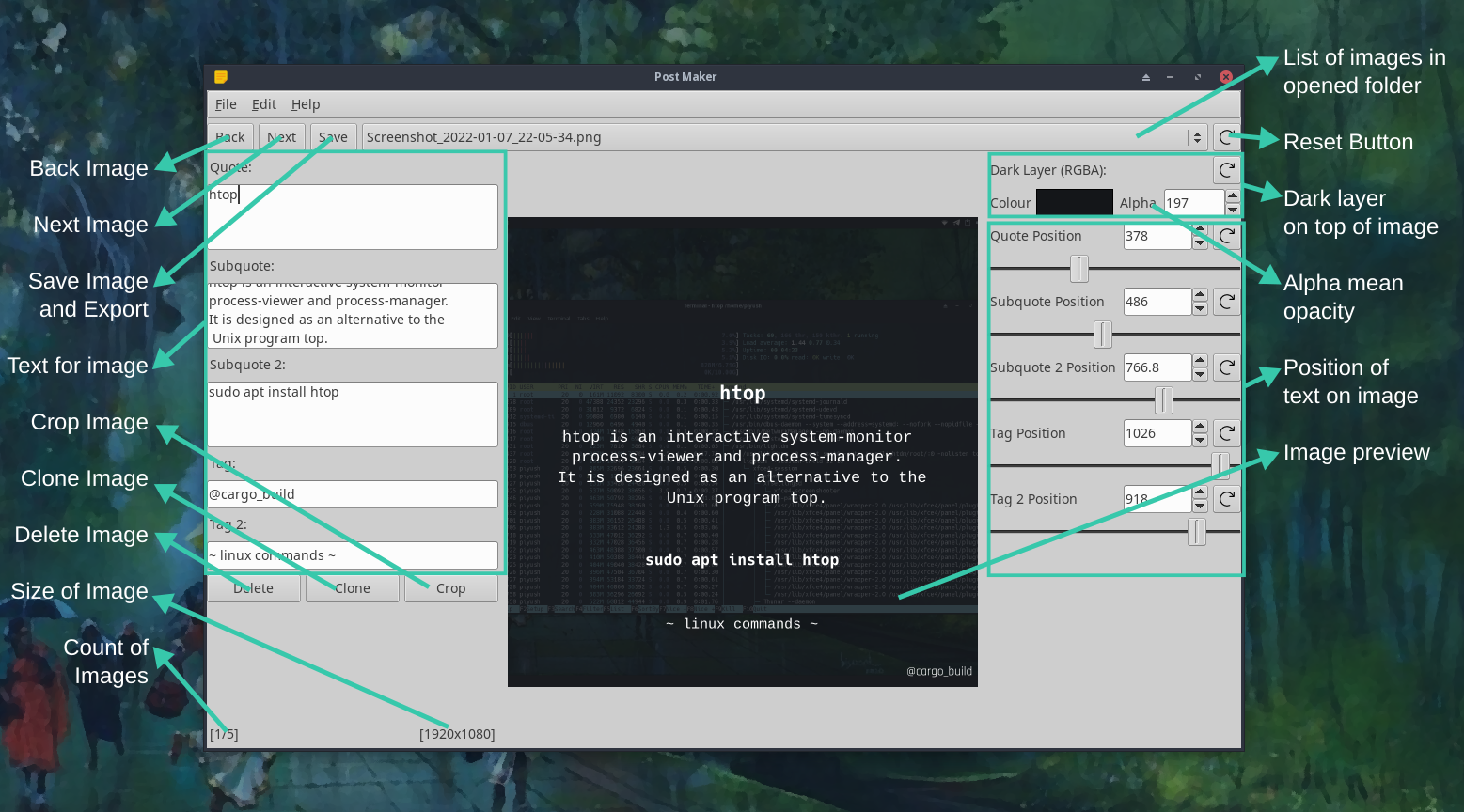
General Overview of Controls
License
This project is under GPLv3